Evaluating New Year Fireworks Vector Illustration for Professional Design Projects
Selecting the right visual assets for seasonal campaigns requires a clear understanding of file formats, scalability, and end-use requirements. When planning graphics for New Year's Eve events, party invitations, or festive posters, designers often weigh the benefits of raster images against vector artwork. A New Year Fireworks Vector Illustration offers a specific set of advantages that distinguish it from standard photography or pixel-based digital art. This analysis explores the technical characteristics of these assets, helping you determine if this format aligns with your current project needs or if an alternative approach might be more suitable.
Defining the Asset: What Makes Vector Fireworks Distinct?
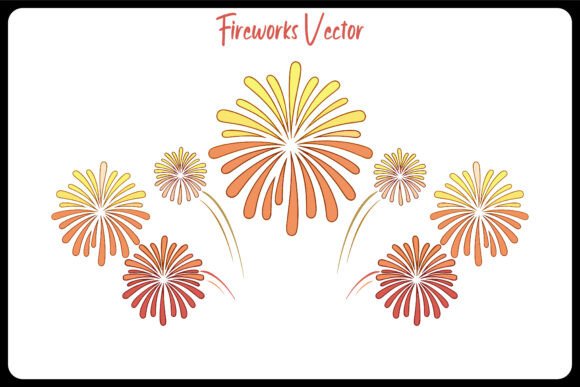
At its core, a New Year Fireworks Vector Illustration is a graphic composed of mathematical paths rather than a grid of colored pixels. Unlike a photograph of fireworks, which captures a single moment with fixed resolution, vector artwork defines shapes, lines, and color fills through code. In the context of holiday design, this typically manifests as stylized bursts, sparkles, and light trails constructed from individual vector shapes.
The primary distinction lies in scalability. Because the image is mathematically defined, it can be enlarged from a small social media icon to a massive billboard without any loss of quality. There is no pixelation or blurring, a common issue when stretching high-resolution JPGs beyond their original dimensions. Furthermore, professional packages often include fully editable files, such as EPS formats compatible with Adobe Illustrator. This allows designers to deconstruct the illustration, modifying individual bursts or adjusting the trajectory of sparks to fit a specific layout composition.
Vector vs. Raster: A Practical Comparison for Holiday Graphics
When deciding between a vector illustration and a high-resolution raster image (such as a 300 DPI photograph), the decision usually hinges on the intended application and the need for customization.
- Flexibility and Editing: Raster images are static; changing the color of a firework burst in a photo requires complex masking and color grading techniques that can look unnatural. In contrast, a vector file containing editable shapes allows for instant color changes. If your brand guidelines require specific gold and silver tones rather than the natural oranges and reds of a real explosion, a vector asset accommodates this instantly.
- File Size and Performance: While modern cameras produce large RAW or TIFF files, optimized vector files (EPS or SVG) are often surprisingly lightweight, containing only the data necessary to draw the shapes. This makes them ideal for web use where loading speed is critical, provided they are exported correctly to web-friendly formats.
- Artistic Style: Photographs offer realism and texture, capturing the smoke and atmospheric haze of a real event. Vector illustrations provide a clean, graphic look. They are better suited for flat design trends, minimalist invitations, or contexts where a stylized, celebratory feel is preferred over documentary realism.
For projects requiring a blend of both, designers often overlay vector elements onto photographic backgrounds. However, if the goal is a cohesive, stylized poster or a print-ready invitation where consistency is key, the vector route is generally superior.
Technical Specifications and Production Readiness
Evaluating a potential download requires scrutiny of the included file types and technical specs. A comprehensive package for a New Year Fireworks Vector Illustration should ideally provide versatility across different software ecosystems.
File Formats: The inclusion of an EPS file is standard for professional print workflows, ensuring compatibility with legacy and current versions of industry-standard software like Adobe Illustrator, CorelDRAW, and InDesign. The presence of a high-resolution JPG preview or fallback is also valuable for quick mockups or clients who do not have vector editing capabilities. Ensure the package is delivered in a ZIP format to keep these assets organized.
Resolution and Color Mode: While vectors are resolution-independent, any accompanying raster previews should be at least 300 DPI to ensure clarity in print proofs. Regarding color, most digital designs utilize RGB color mode, which offers a wider gamut suitable for screens and modern digital printing. However, if your final output is strictly for offset printing, verify if the vendor provides a CMYK conversion or if you will need to convert the RGB vectors yourself, keeping in mind that some neon brights may shift during conversion.
Editability: The true value of a premium design lies in its structure. Look for descriptions indicating "100 vector shapes" or similar metrics. This suggests the artwork is not a flattened group but a collection of distinct objects. This level of granularity allows you to isolate specific bursts, rearrange elements to fit text areas, or delete unwanted parts without damaging the rest of the composition.
Ideal Use Cases and Application Scenarios
Understanding where this asset fits best helps maximize your return on investment. The clean lines and scalable nature of vector fireworks make them particularly effective in several scenarios:
- Large Format Printing: For banners, backdrop walls at events, or outdoor signage, vectors are indispensable. You can scale the artwork to any size required by the printer without worrying about source resolution limits.
- Branded Invitations: Corporate parties or exclusive galas often require strict adherence to brand colors. An editable vector file allows you to match the fireworks exactly to your company palette, creating a custom look that off-the-shelf photos cannot achieve.
- Digital Animations: While the base file is static, the separated vector shapes can be easily imported into motion graphics software (like After Effects) to create animated intros or social media stories. Having individual layers simplifies the rigging process for animation.
- Merchandise and Apparel: For t-shirts, mugs, or tote bags sold as seasonal merchandise, vector graphics ensure crisp edges when printed via screen printing or vinyl cutting.
Limitations and When to Consider Alternatives
Despite their strengths, New Year Fireworks Vector Illustrations are not a universal solution. It is important to recognize their limitations to avoid mismatched expectations.
If your project demands photorealism—perhaps for a news article about a specific city's celebration or a documentary-style video—a stylized vector graphic may appear too artificial or cartoonish. In these cases, licensing high-quality stock photography or footage is the more appropriate choice. Additionally, while vectors are excellent for solid colors and gradients, they can struggle to replicate the complex, chaotic texture of smoke and fine particulate matter found in real explosions without becoming overly complex and heavy.
Furthermore, users without access to vector editing software (such as Adobe Illustrator) may find the EPS files difficult to utilize fully. While the included JPG serves as a usable image, the inability to edit the vector paths limits the asset's flexibility for non-designers. In such situations, a pre-rendered high-resolution PNG with a transparent background might be a more practical, albeit less flexible, alternative.
Making the Final Decision
Choosing the right asset comes down to balancing your need for customization against your workflow constraints. If you require a graphic that can adapt to various sizes, adhere to specific brand colors, and remain crisp across both digital and print media, a New Year Fireworks Vector Illustration is a robust investment. The ability to modify 100+ individual shapes provides a level of creative control that raster images simply cannot match.
However, if your timeline is tight, you lack vector editing tools, or your aesthetic goal is purely photographic realism, sticking to high-resolution raster assets may save you time and effort. By evaluating the specific technical deliverables—such as the inclusion of EPS and JPG files, RGB color modes, and the editability of the shapes—you can ensure the resource you select integrates seamlessly into your design pipeline. Ultimately, the best choice is the one that aligns with your production capabilities and the visual tone of your final campaign.